
Azure Private Link Service (PLS) has long been the go-to option for exposing your services privately to consumers across Azure — ensuring that traffic never crosses the public internet.
Until recently, this required a Standard Load Balancer to sit in front of your service. That setup worked well, but it added complexity and limited flexibility, especially in hybrid or custom routing scenarios.
Now, with Private Link Service Direct Connect, Microsoft has simplified the model. You can route traffic directly to any privately routable IP address, removing the dependency on load balancers altogether.
This new feature opens the door to several use cases — from simplifying secure hybrid connections to enabling private access to third-party SaaS and appliances.
Tag: getpractical
How to Troubleshoot High Memory Pressure on an Azure VM Using Performance Diagnostics
Recently, I had to troubleshoot a case of performance degradation on an Azure VM. The key symptom was high memory pressure, which in Azure means the system is under heavy strain to fulfill memory requests — often leading to lag, paging, and slow performance.
To get to the root cause, we used Azure Performance Diagnostics (PerfInsights) — a powerful and easy-to-use troubleshooting tool. Here’s how you can install and use it from the Azure Portal, without needing to log in to the VM.
Unlocking Nested Virtualization in Azure: A Step-by-Step Guide

Nested virtualization in Azure is a powerful feature that enables running a Hyper-V hypervisor within an Azure virtual machine (VM). This capability is invaluable for developers, machine learning engineers, and data scientists who require flexible and scalable environments for testing, development, or containerized applications. This post provides a step-by-step guide to setting up nested virtualization, ensuring you can leverage its full potential.
Prerequisites and Supported VM Sizes
Before diving into the setup, ensure you choose an Azure VM that supports nested virtualization. Compatible VM sizes include:
- Dv3, Dsv3
- Dv4, Dsv4
- Ddv4, Ddsv4
- Ev3, Esv3
- Ev4, Esv4
- F2s_v2 to F72s_v2
- FX4 to FX48
- M series
For most use cases, the Dv3 and Ev3 series are excellent choices. Make sure the VM size meets the system requirements for your intended workloads, such as Docker Desktop.
Step 1: Deploying an Azure VM
- Create the VM:
- Log in to the Azure Portal.
- Select a Windows Server image and choose a compatible VM size.
- Configure Networking:
- Set up the required inbound and outbound port rules.
- Deploy:
- Review your configuration and deploy the VM.
Continue reading “Unlocking Nested Virtualization in Azure: A Step-by-Step Guide”
Azure Function TimerTrigger1 failed due to timeout exception
Hello guys,
Today I’d like to share one of the issues that I had in Azure of one of the company customers I work for.
The customer has a script that turns VMs ON/OFF based on the time stated on the VM’s tag. For example, a VM has a tag “StartTime: 06:00” and “StopTime: 23:00”, this Azure Function runs every 1 hour and compares the current time with the time stated on the VM’s tag, if the time matches, the VM will be turned ON/OFF.
Everything was working very well, but when the customer decided to increase the number of tagged VMs, the Azure Function started returning with the timeout error. We initially thought it was the “Consumption plan”, which by default has a timeout of 5 minutes. We changed the plan, which allowed unlimited timeout (1 hour recommended by MS). And yet the function continues to give the timeout error.

We decided to split the VMs with a trigger for each subscription (The initial Azure function varies all subscriptions by looking for the tag and comparing the time), it didn’t work either.

We raised a ticket with MS, it took several days of troubleshoot and nothing to find the root cause of the problem. Until I decided to look deeper into the function code and realized that every time the function was executed and the script turned ON/OFF a VM, the function had a significant pause in between turning ON/OFF VMs.

So I decided to add to the code -NoWait and guess what? It worked!! The timeout stopped happening and the function started to be executed in less than 2 minutes, even with several VMs being tagged.
Initial code: Start-AzVM -Name $vm.Name -ResourceGroupName $vm.ResourceGroupName
Final code: Start-AzVM -Name $vm.Name -ResourceGroupName $vm.ResourceGroupName –NoWait
Ps. I don’t want to share the whole code, as I took it from the customer environment.
Apparently the function worker was waiting for a return from the previous command (Stop or Start the tagged VM), but in some cases the return wasn’t happening and the function was getting stuck.
In the moment I added the command to ignore the return (-NoWait) the function started working perfectly again.
That’s all for today guys, see you later!
Joao Costa
Goodbye 2021 and Welcome 2022! #ThankYou

Hey guys!
Today I just come here to thank you and share with you our goals achieved with the blog in this first year. We (Bruno and I) started this blog in February 2021, more precisely on 11/02/2021. Our idea was to share our knowledge and experience, help other people, learn and evolve as professionals. Honestly, we are very happy with our results and even more with our knowledge evolution, throughout the year we received several feedbacks and we were really happy with the idea of having helped some people and maybe many others around the world. Of course we need to say that it is daring to create a blog in a language that is not our native language, and this was and is a great challenge for us, but we believe that the message has been delivered and we hope that in 2022 we can make everything even better , always aiming to evolve.
Blog Statistics
As a bloggers focusing on Microsoft cloud computing and Cisco collaboration, it is always fun and challenging. The traffic to our blog grew significantly as it’s first year. In almost 1 year, this blog hits over 15 thousand views with 40 blog posts.
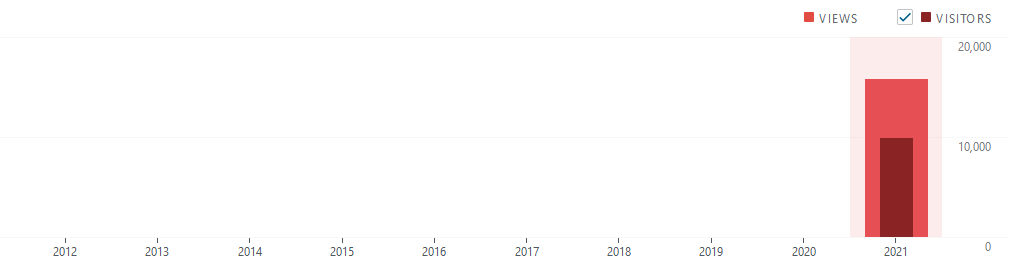
This blog was viewed as follows:
Monthly Average Views: 1.437
Most Visited Month: September
Most Visited day: September 13th
Most popular Blog Post: Cisco Finesse – Disconnection Problems
Most Popular day: Tuesday (21% of views)
Most Popular hour: 3:00 pm (7% of views)
Blog Followers: 21 (A huge Thank you!)

Comparing the first post with only 2 views (Bruno and I lol), with the most viewed post so far with 2,111 views.

Where did the readers come from? TOP 10 Referrers

Where did the readers come from? TOP 10 Countries

As I said before, a hell of a year of growth and evolution for this humble blog.
We can’t wait for 2022, which will come with interesting personal and professional challenges.
And in closing, I would like to wish everyone a happy new year, thanks to all readers and followers. May you all have a healthy, successful and outstanding New Year!
Thanks you for reading, see you in 2022!
You are welcome to share your thoughts and suggestions in the comment section below
Got it? Get Practical!

 Get Practical