Enable OpenTelemetry in Azure Functions: The Easiest Way via Azure Portal

Good news! As of June 2025, OpenTelemetry is now in preview for Azure Functions. If you want basic observability without writing code or installing libraries, you can now enable distributed tracing directly from the Azure Portal.

This quick guide shows the simplest way to enable OpenTelemetry in Azure Functions using built-in features — no NuGet packages or custom code needed.


What You Need

  • An existing Azure Function App (v4)

  • Application Insights already enabled (most new Function Apps have this by default)


Continue reading “Enable OpenTelemetry in Azure Functions: The Easiest Way via Azure Portal”

Azure Resource Locks – The One Feature You’re Probably Not Using (But Should Be)

Accidental deletion or modification of critical resources in Azure is more common than most teams would like to admit. And unlike on-prem environments, where layers of approvals or access barriers might slow someone down, Azure’s agility can sometimes be its own worst enemy — especially when production workloads are one click away from disappearing.

Enter: Azure Resource Locks — your environment’s seatbelt.

What Are Azure Resource Locks?

Azure Resource Locks are a built-in feature that allow you to restrict operations on resources, resource groups, or subscriptions. These locks act as a last line of defense — even if someone has Contributor or Owner permissions, a lock will block unwanted actions like deletion or configuration changes.

Continue reading “Azure Resource Locks – The One Feature You’re Probably Not Using (But Should Be)”

How to Implement Azure Bastion to Securely Access Azure Virtual Machines

Bastion

When managing cloud-based virtual machines, ensuring secure access is critical. Exposing RDP/SSH ports over the internet introduces potential security vulnerabilities. Azure Bastion provides a secure, fully managed solution to connect to Azure VMs without needing to expose these ports to the public internet.

What is Azure Bastion?

Azure Bastion is a PaaS service that allows you to securely connect to your Azure Virtual Machines (VMs) using RDP or SSH, directly from the Azure Portal without the need to expose these ports via a public IP.


Minimum Required RBAC Roles for Azure Bastion Access

To connect to a VM using Azure Bastion, the user must have the appropriate permissions. At a minimum, they will need the following role assignments:

  1. Reader role on the target VM: This grants read access to the VM, allowing the user to see the VM’s configuration but not modify it.
  2. Reader role on the network interface (NIC) associated with the VM’s private IP address: This ensures the user can read network information for the VM.
  3. Reader role on the Azure Bastion resource: This grants access to the Bastion host itself, allowing the user to initiate connections through Bastion.

If the VM is in a peered virtual network (cross-VNet connections), the following additional role assignment is required:

  1. Reader Role on the virtual network (VNet) of the target VM: This is necessary if you are connecting to a VM across VNet peering.

Continue reading “How to Implement Azure Bastion to Securely Access Azure Virtual Machines”

Integrate Other Clouds with Azure Using the Multicloud Connector

multi-cloud

Introduction

As businesses adopt multi-cloud strategies to leverage the unique strengths of various cloud providers, managing these environments can become complex. Microsoft’s Azure Arc Multicloud Connector provides a streamlined solution to integrate and manage resources across different cloud platforms, specifically focusing on AWS. This blog post will explore the capabilities of the Azure Arc Multicloud Connector and guide you through a step-by-step lab to connect AWS resources to Azure.

Key Features of the Multicloud Connector

1. Unified Inventory: The Multicloud Connector automatically collects metadata from external cloud resources, providing a comprehensive view within the Azure portal. This helps in maintaining a consistent inventory across cloud environments.
2. Arc Onboarding: It facilitates the onboarding of AWS EC2 instances to Azure Arc, allowing advanced management features like policy enforcement, monitoring, and configuration management.
3. Consistent Governance: Apply Azure policies and role-based access controls (RBAC) to resources in external clouds, ensuring uniform security and compliance standards across all environments.
4. Enhanced Management: Utilize Azure Arc capabilities for onboarded resources, including vulnerability scanning and deployment automation.

Implementation Steps

Prerequisites

– An Azure subscription with Contributor access.
– An AWS account with AmazonEC2FullAccess permissions.
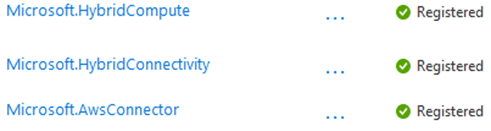
– Azure Arc and required resource providers registered (Microsoft.HybridCompute, Microsoft.HybridConnectivity, Microsoft.AwsConnector).
image

Continue reading “Integrate Other Clouds with Azure Using the Multicloud Connector”

Microsoft Announces Mandatory MFA for All Azure Users

Authentication Icon

Microsoft has recently announced a significant change that will impact all Azure users: the mandatory implementation of Multifactor Authentication (MFA). This update aims to enhance security across the Azure platform by requiring additional verification for users accessing various Azure services.

Official Announcement: Read Microsoft’s MFA Requirement for Azure Users

Understanding the Changes

This update will affect all users interacting with the Azure Portal, Azure CLI, Azure PowerShell Modules, and Terraform when deploying to Azure. This includes guest accounts, service accounts, and break glass accounts.

Continue reading “Microsoft Announces Mandatory MFA for All Azure Users”