Exploring the Webex API: A Step-by-Step Guide to Generating Your Access Token

Hey guys!

Today, let’s dive into the Webex API and how you can leverage it to build your own custom integrations.

I recently began exploring the Webex REST API, but I wanted to use my own code rather than relying only on the web browser.
While the Webex Developer Portal allows you to perform all actions directly online once you’re logged in (automatically using your token for requests), I preferred a more flexible approach that didn’t tie me to the browser.

So, in this post, I’ll show you how to generate your own access token to use in your custom code.

So, these are the steps you will have to do to achieve this:

Continue reading “Exploring the Webex API: A Step-by-Step Guide to Generating Your Access Token”

Expressway – Exporting Banned addresses using PowerShell

Hey guys,

In this post I will show you one situation I came across this week.
Due some attacks we’ve been suffering, we decided to get all blocked IPs on Expressway and block them also in the local Firewall, as a workaround while we investigate it better.

The thing is, how can we export the list of Banned IP addresses on Expressway?
As I didn’t find anything, I decided to do on my way, automating it.

Continue reading “Expressway – Exporting Banned addresses using PowerShell”

Cisco CUCM – MRA (Mobile and Remote Access) – Overview

Hey guys,

Today I’m going to talk about a very useful solution, part of the Cisco Collaboration Edge Architecture: MRA.
This post is going to be the first part, to cover the concepts, requirements and compatibilities.

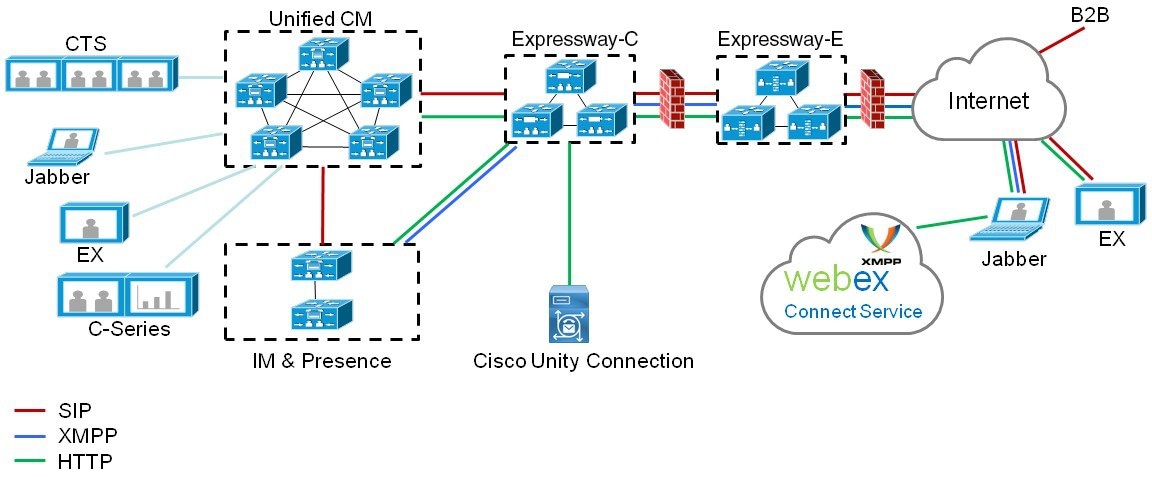
Basically, MRA (Cisco Unified Communications Mobile and Remote Access) allows endpoints such as Cisco Jabber to have their registration, call control, provisioning, messaging and presence services provided by CUCM when the endpoint is outside the enterprise network. The Expressway provides secure firewall traversal and line-side support for Unified CM registrations.

This solution supports a hybrid on-premises and cloud-based service model. It provides a secure connection for Jabber application traffic and other devices with the required capabilities to communicate without having to connect to a VPN. It is a device and operating system agnostic solution for Cisco Jabber clients on Windows, Mac, iOS and Android platforms.

MRA allows Jabber clients that are outside the enterprise to do the following:

  • Use Instant Messaging and Presence services
  • Make voice and video calls
  • Search the corporate directory
  • Share content
  • Launch a web conference
  • Access visual voicemail

Components

MRA requires Expressway (Expressway-C and Expressway-E) and Unified CM, with MRA-compatible soft clients and/or fixed endpoints. The solution can optionally include the IM and Presence Service and Unity Connection.

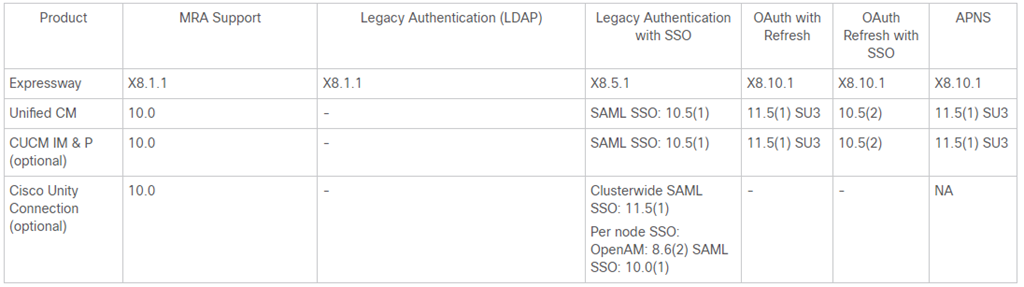
Product Versions

image

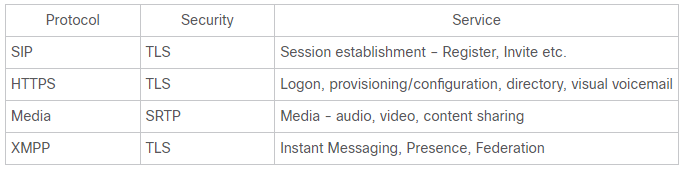
Protocols

image

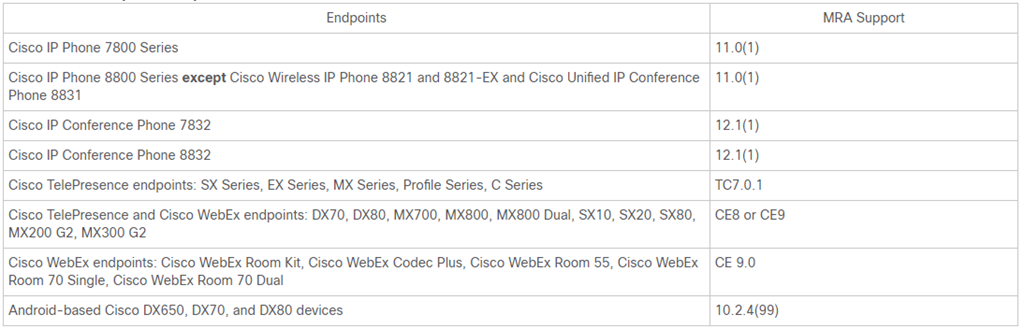
Compatible Endpoints

image

If you are deploying any of these devices to register with Cisco Unified Communications Manager through MRA, be aware of the following points. For DX endpoints, these considerations only apply to Android-based devices and do not apply to DX70 or DX80 devices running CE software:

  • Trust list: You cannot modify the root CA trust list on Cisco IP Phone 7800 Series and Cisco IP Phone 8800 Series devices. Make sure that the Expressway-E’s server certificate is signed by one of the CAs that the devices trust, and that the CA is trusted by the Expressway-C and the Expressway-E.

  • Off-hook dialling: The way KPML dialling works between these devices and Unified CM means that you need Cisco Unified Communications Manager 10.5(2)SU2 or later to be able to do off-hook dialling via MRA. You can work around this dependency by using on-hook dialling.

Cisco CUCM Requirements

CUCM dial plan will not be impacted by devices registering via Expressway. Remote and mobile devices still register directly to Unified CM and their dial plan will be the same as when it is registered locally.

Unified CM nodes and Expressway peers can be located in different domains. For example, your Unified CM nodes may be in the enterprise.com domain and your Expressway system may be in the edge.com domain.

In this case, Unified CM nodes must use IP addresses or FQDNs for the Server host name / IP address to ensure that Expressway can route traffic to the relevant Unified CM nodes.

Unified CM servers and IM and Presence Service servers must share the same domain.

  • Certificates

Two certificates on CUCM are significant for Mobile and Remote Access: CallManager certificate and Tomcat certificate.
PS:
If you do use self-signed certificates, the two certificates must have different common names. The Expressway does not allow two self-signed certificates with the same CN. So if the CallManager and tomcat self-signed certificates have the same CN in the Expressway’s trusted CA list, the Expressway can only trust one of them. This means that either secure HTTP or secure SIP, between Expressway-C and Cisco Unified Communications Manager, will fail.

The Expressway certificate signing request (CSR) tool prompts for and incorporates the relevant Subject Alternative Name (SAN) entries as appropriate for the Unified Communications features that are supported on that Expressway.

The Expressway-C server certificate must include the following elements in its list of subject alternate names: Unified CM phone security profile names and
IM and Presence chat node aliases (federated group chat)

The Expressway-E server certificate needs to include the following elements in its list of subject alternative names (SAN): Unified CM registrations domains, XMPP federation domains and IM and Presence chat node aliases (federated group chat)

That’s it for today guys….just an overview.
In the next posts, I’m going to go a bit deeper in the configuration.

Hope you’ve enjoyed!

See ya!

Bruno

Cisco CUCM – Reports from SQL (show risdb)

Hey guys,

In my last post, I gave you some tips on how pull CDRs out from CUCM using SQL commands (Cisco CUCM – CDR through SQL). Today, I’m going to show other useful reports you can get using SQL commands.

As we are getting all the information from a CLI command, you will need to export the data to an excel file  to create something nice to be presented….or even use Python, PHP, to create something automatic for you.

Today I’m going to focus on one command, but with different variables and outputs: show risdb
This command displays RIS database table information.

Parameters

list : displays the tables that are supported in the Realtime Information Service (RIS) database.
query : displays the contents of the RIS tables

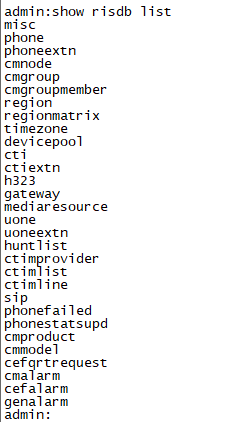
So, if you enter the command show risdb list, you will see a list of options in the table that you can explore.

image

The most common, and used, is the Phone.
To access this table, you must use this command: show risdb query phone.

image

This command is so powerful and useful!!! Here we see everything related to your phones: DeviceName, Descr, Ipaddr, Ipv6addr, Ipv4Attr, Ipv6Attr, MACaddr, RegStatus, PhoneProtocol, DeviceModel, HTTPsupport, #regAttempts, prodId, username, seq#, RegStatusChg TimeStamp, IpAddrType, LoadId, ActiveLoadId, InactiveLoadId, ReqLoadId, DnldServer, DnldStatus, DnldFailReason, LastActTimeStamp, Perfmon Object.

In other words, you can have a list of devices in your Cluster, check each phone is currently Registered or Unregistered, and its information such as IP, Protocol, Model……an excellent Report Smile

But, if you want to explore it a bit more, there are other interesting queries!
For example, if you want to have a report about your SIP Trunks, you can use this command: show risdb query sip.

Here you have information about your SIP Trunk, such as name, IPs, descriptions, Status, Peer Status.

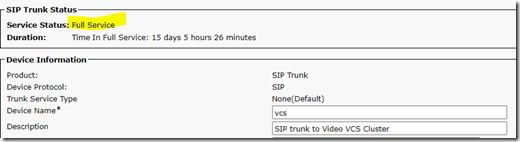
This is the Trunk on CUCM:

image

image

The Status column (in red) corresponds to the “Service Status” field visible near the top of CCMAdmin’s SIP Trunk page.

0 – No service (The Trunk peer is reachable via TCP, but SIP Options ping is failing)
1 – Full service (All Trunk peers are up and SIP Options ping is successful)
2 – Partial service (A subset of Trunk peers are unreachable)
3 – Unknown (The Trunk peer is unreachable via TCP, or SIP Options ping is not enabled)

image

The PeerStatus column (in blue) corresponds to the “Status” field for each peer on the SIP Trunk page (near the bottom).

0 – Down
1 – Up

Now it’s up to you to choose a query from RSIDB list and start to explore it. You will find interesting options there, like CTIs, Gateways…..

Hope you’ve enjoyed it Smile

See ya!

Bruno

Cisco CUCM – CDR through SQL

Hey everybody,

Today’s post is going to be quick, but may give you some good tips Smile
Last week I got some requests from a Customer, and he needed to know which extensions were recently being used . In order to save licenses, he wanted to delete all phones/lines that weren’t being used.

CDRs on CUCM is a nightmare in my opinion. Mainly when you need to check lots of lines, for a long period.
That’s why I decide to pull this information out directly from SQL.

So here are some useful commands to get CDRs from SQL, and depending on your needs and knowledge, you can use Python or other language to built your own CDR Reporting Smile

First of all, to use the commands you need to ensure that the following steps are taken on your CUCM system:

  1. Activate the CDR Analysis and Reporting (CAR) service on the CUCM publisher node.
  2. Go to System > Service Parameters and set the Cisco Call Manager service “Call Diagnostics Enabled” parameter to true on every cluster node that has the Call Manager service activated.

Now, going to SQL, this is the structure of any SQL Command on CUCM:
admin: run sql select [field list] from [table] where [expression]

The table we are going to use is tbl_billing_data. This table stores all of the elements we need to accomplish the task at hand.

So this is going to be our syntax: run sql select + column + from tbl_billing_data + where + column + (like,in,between,etc).

PS: Please not this command is only acceptable on Publisher.

In my example, I want to get Date (TimeStamp) , Calling and Called Number of all calls from extensions which have “702709” in their numbers and happened this month.

The date must be sent in TimeStamp mode. I use THIS SITE to convert normal date to Timestamp, and vice versa. If you were pulling CDR data into Excel then you can use the following formula (in a new cell) to do the conversion:
=(((A1-(6*3600))/86400)+25569)

Right, so this is the command:

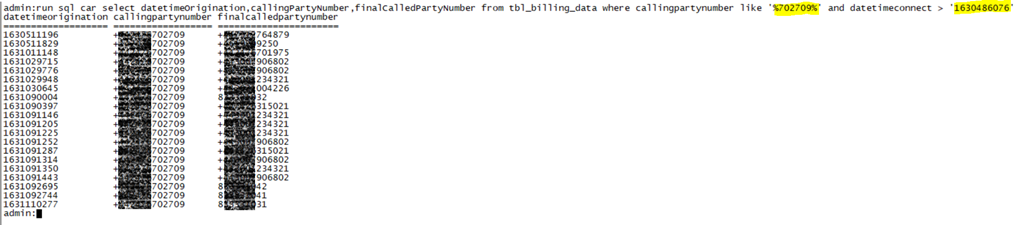
run sql car select datetimeOrigination,callingPartyNumber,finalCalledPartyNumber from tbl_billing_data where callingpartynumber like ‘%702709%’ and datetimeconnect > ‘1630486076’

And here is the result:

image
Well, now you can explore and play a bit more, depending on your needs. You can add more columns, like duration, destIpAddr, callingPartyNumber_uri, originalCalledPartyPattern,callingPartyNumberPartition,EU_SIP_SME_NOS….

That’s it guys. As I said, it was really quick Smile

Hope you’ve enjoyed!

Bruno