
Most patching dashboards are great for interactive views—but what if your stakeholders want a scheduled email that shows the current patch compliance for only a scoped set of servers (for example, those tagged for patch governance)? That’s where a small, reliable custom report shines.
In this post I’ll walk through the exact solution I built: a Logic App that queries Azure Update Manager data via Azure Resource Graph (ARG), filters to VMs tagged Monthly_Patch : yes, formats the results into a clean HTML email, and sends it on a monthly cadence.
Why a custom report?
- No native email report: Azure Update Manager provides blades and workbooks, but not a ready-to-send, nicely formatted email.
- Audience-specific scoping: We only want to report on VMs with a specific business tag (
Monthly_Patch : yes). - Consistent sorting & formatting: Stakeholders wanted alphabetical order, readable timestamps, color-coded rows, and centered table content.
- Lightweight & fast: With ARG we can query Update Manager resources directly—no Log Analytics workspace required for this report.
What we’ll build
A monthly Logic App that:
- Queries Update Manager assessment and last installation results via ARG
- Queries ARG for VMs tagged
Monthly_Patch : yes - Filters the compliance data to those tagged VMs
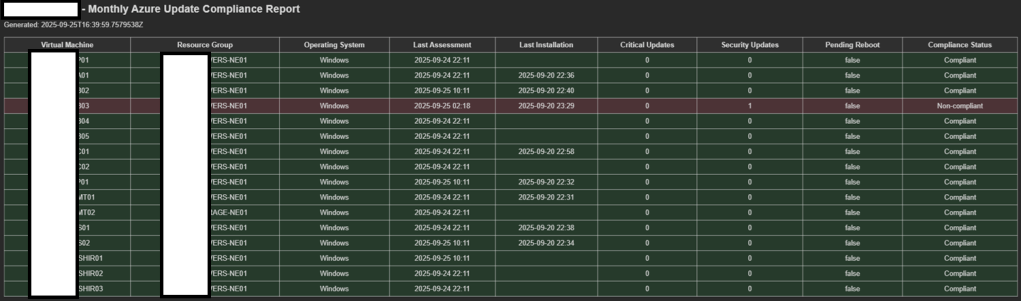
- Renders a styled HTML table (centered cells, color-coded rows)
- Emails the report
The end result looks like this:
Prerequisites
- A Logic App (Consumption or Standard) with System-assigned Managed Identity enabled
- MI permission: Reader (or higher) on the subscription you will query
- Ability to send mail via Office 365 connection (use a licensed mailbox)
- Update Manager assessments enabled on your VMs
Architecture at a glance
- Azure Resource Graph: fetches patch assessments and installation summaries
- Logic App: orchestrates queries, filters results to tagged VMs, builds HTML, sends mail
- Tag filter: only VMs with
Monthly_Patch : yesare included
The final Logic App (production)
Below is the exact, working flow and the reasoning behind each step.
Trigger — Recurrence
Runs monthly (you can change the cadence to weekly/daily/custom).
Action 1 — HTTP (ARG: Update compliance)
- What: Runs an ARG query to pull the latest Update Manager assessment + last install per VM, calculates a compliance label, and sorts alphabetically by VM.
- Why: Gives us all the fields we need in one pass, fast.
- Notes: Auth with Managed Identity; audience
https://management.azure.com/.
Endpoint
POST https://management.azure.com/providers/Microsoft.ResourceGraph/resources?api-version=2021-03-01
Method: Post
Headers
Content-Type: application/json
Body (Replace the subscription)
{
"subscriptions": [
"XXXXXXXXXXXXXXXXXXXXXXXXXXXXXXXXXXXXXXXXXX"
],
"query": "patchassessmentresources | where type !has 'softwarepatches' | extend p = parse_json(properties) | extend LastAssessment = todatetime(p.lastModifiedDateTime), OSType = tostring(p.osType), Critical = toint(p.availablePatchCountByClassification.critical), Security = toint(p.availablePatchCountByClassification.security), Other = toint(p.availablePatchCountByClassification.updates), PendingReboot = tostring(p.rebootPending), RG = tostring(split(id, '/')[4]), VM = tostring(split(id, '/')[8]), SubId = tostring(split(id, '/')[2]) | summarize arg_max(LastAssessment, *) by id | project SubId, RG, VM, OSType, LastAssessment, Critical, Security, Other, PendingReboot | join kind=fullouter ( patchinstallationresources | where type !has 'softwarepatches' | extend p = parse_json(properties) | extend LastInstall = todatetime(p.lastModifiedDateTime), OSTypeIns = tostring(p.osType), Installed = toint(p.installedPatchCount), Failed = toint(p.failedPatchCount), Pending = toint(p.pendingPatchCount), NotSelected = toint(p.notSelectedPatchCount), RG = tostring(split(id, '/')[4]), VM = tostring(split(id, '/')[8]), SubId = tostring(split(id, '/')[2]) | summarize arg_max(LastInstall, *) by SubId, RG, VM | project SubId, RG, VM, LastInstall, Installed, Failed, Pending, NotSelected, OSTypeIns ) on SubId, RG, VM | extend Critical = coalesce(Critical, 0), Security = coalesce(Security, 0), Other = coalesce(Other, 0), Installed = coalesce(Installed, 0), Failed = coalesce(Failed, 0), Pending = coalesce(Pending, 0), NotSelected = coalesce(NotSelected, 0), PendingReboot = tostring(coalesce(PendingReboot, 'false')), LastAssessment = todatetime(LastAssessment), LastInstall = todatetime(LastInstall), OSType = coalesce(OSType, OSTypeIns) | extend NonCompliantCount = Critical + Security | extend Compliance = case(isnull(LastAssessment), 'No assessment', NonCompliantCount > 0, 'Non-compliant', PendingReboot == 'true', 'Pending reboot', 'Compliant') | extend SortKey = tolower(VM) | order by SortKey asc | project SubId, RG, VM, OSType, LastAssessment, LastInstall, Critical, Security, Other, Installed, Failed, Pending, NotSelected, PendingReboot, Compliance | limit 1000",
"options": {
"resultFormat": "objectArray"
}
}
Highlights inside the KQL:
- Join assessment and installation resources
- Coalesce numeric fields
- Calculate a Compliance label
(No assessment,Non-compliant,Pending reboot,Compliant) - Sort with
SortKey = tolower(VM)so the email rows stay in alpha order
Authentication

Action 2 — Parse JSON
Parses the compliance HTTP results .
Content: Body (From the Action 1)
Schema
{ "type": "object", "properties": { "data": { "type": "array", "items": { "type": "object" } }, "totalRecords": { "type": "integer" }, "count": { "type": "integer" }, "facets": { "type": "array" }, "resultTruncated": { "type": "string" } }, "required": [ "data" ]}Action 3 — HTTP_TaggedVMs (ARG: Scope filter)
Follow the same steps as the Action 1, but with a different body code
- What: Queries ARG for VMs with
Monthly_Patch : yes - Why: Lets us scope the final report to the exact VM population stakeholders care about.
KQL (You need to customise the subscription and the tag here)
{
"subscriptions": [
"XXXXXXXXXXXXXXXXXXXXXXXXXXXXXXXXXXXXXXXXXX“
],
“query”: “resources | where type =~ ‘microsoft.compute/virtualmachines’ and tostring(tags[‘Monthly_Patch’]) =~ ‘yes’ | project id, subscriptionId, resourceGroup, name”,
“options”: {
“resultFormat”: “objectArray”
}
}
Action 4 — ParseJSON_TaggedVMs
Content: Body (From the Action 3)
Schema
{ "properties": { "data": { "type": "array", "items": { "properties": { "id": { "type": "string" }, "subscriptionId": { "type": "string" }, "resourceGroup": { "type": "string" }, "name": { "type": "string" } }, "required": [ "id", "subscriptionId", "resourceGroup", "name" ] } } }}Action 5 — Initialize variable (TaggedIds)
Creates an empty array to hold the allowed resource IDs.

Action 6 — ForEach_TaggedVMs → Append to array
- Iterate the tagged VMs; push
toLower(id)intoTaggedIds. - Why: Normalize case before matching; ARM IDs can vary in case.

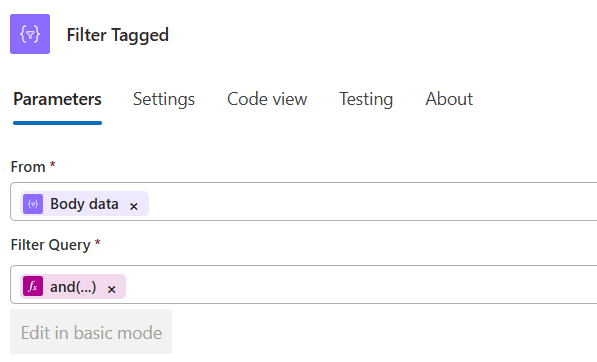
@toLower(item()?['id'])Action 7 — Filter_Tagged (Query/Filter array)
- From: the compliance
data - Where: builds the VM’s ARM ID from
SubId/RG/VM, lowercases it, and checks membership inTaggedIds.
@and(
not(empty(item()?['SubId'])),
not(empty(item()?['RG'])),
not(empty(item()?['VM'])),
contains(
variables('TaggedIds'),
tolower(
concat(
'/subscriptions/', item()?['SubId'],
'/resourceGroups/', item()?['RG'],
'/providers/Microsoft.Compute/virtualMachines/', item()?['VM']
)
)
)
)
Action 8 — Select
- Shapes the fields your HTML row will reference (kept short and simple):
VM, RG, OSType, LastAssessment, LastInstall, Critical, Security, PendingReboot, Compliance
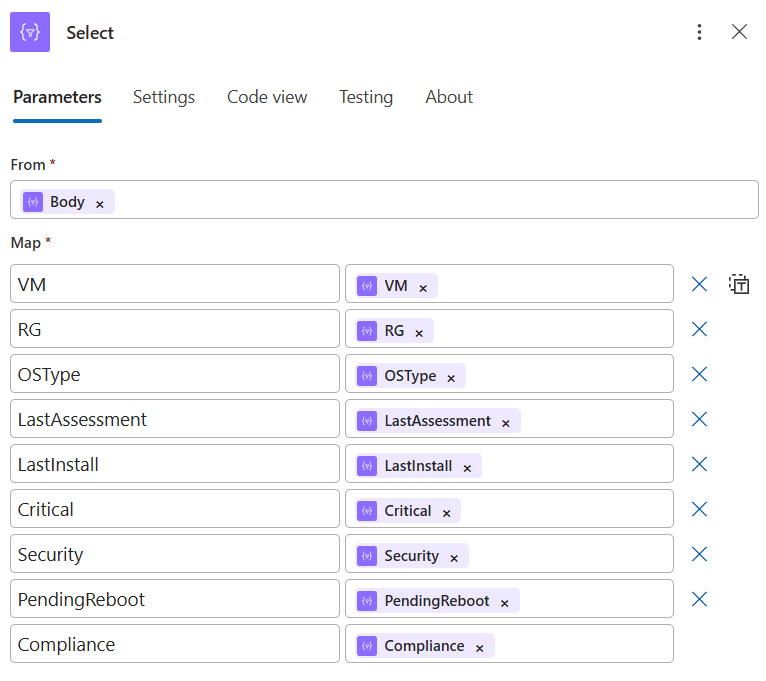
Keeping names short here makes the HTML step easy to read. If you prefer full names, you can rename here and update the row template accordingly.
Action 9 — Initialize variables (HTML)
Starts the HTML, CSS, and table header. We center only the table content:
[ { "name": "HTML", "type": "string", "value": "<html>\n <head>\n <style>\n body { font-family: Arial, sans-serif; font-size: 13px; color: #333; }\n h2 { margin: 0 0 10px 0; }\n p { margin: 0 0 15px 0; }\n table { border-collapse: collapse; width: 100%; }\n th, td { border: 1px solid #ccc; padding: 6px 8px; text-align: center; }\n th { background-color: #f2f2f2; font-weight: bold; }\n </style>\n </head>\n <body>\n <h2>Monthly Azure Update Compliance Report</h2>\n <p>Generated: @{utcNow()}</p>\n <table>\n <thead>\n <tr>\n <th>Virtual Machine</th>\n <th>Resource Group</th>\n <th>Operating System</th>\n <th>Last Assessment</th>\n <th>Last Installation</th>\n <th>Critical Updates</th>\n <th>Security Updates</th>\n <th>Pending Reboot</th>\n <th>Compliance Status</th>\n </tr>\n </thead>\n <tbody>\n" }]Action 10 — For_each (Concurrency = 1) → Append row
Sequential on purpose, so the ordering from ARG is preserved.
Row template (color-coded):
<tr style="background-color:@{if(equals(items('For_each')?['Compliance'],'Compliant'),'#d4edda', if(equals(items('For_each')?['Compliance'],'Pending reboot'),'#fff3cd', if(equals(items('For_each')?['Compliance'],'Non-compliant'),'#f8d7da','#e2e3e5')))};"> <td>@{items('For_each')?['VM']}</td> <td>@{items('For_each')?['RG']}</td> <td>@{items('For_each')?['OSType']}</td> <td>@{if(empty(items('For_each')?['LastAssessment']),'', replace(substring(string(items('For_each')?['LastAssessment']),0,16),'T',' '))}</td> <td>@{if(empty(items('For_each')?['LastInstall']),'', replace(substring(string(items('For_each')?['LastInstall']),0,16),'T',' '))}</td> <td>@{string(items('For_each')?['Critical'])}</td> <td>@{string(items('For_each')?['Security'])}</td> <td>@{string(items('For_each')?['PendingReboot'])}</td> <td>@{items('For_each')?['Compliance']}</td></tr>The date formatting here stays intentionally simple and null-safe (substring + replace).

Action 11 — Append_to_string_variable_1
Closes the HTML:
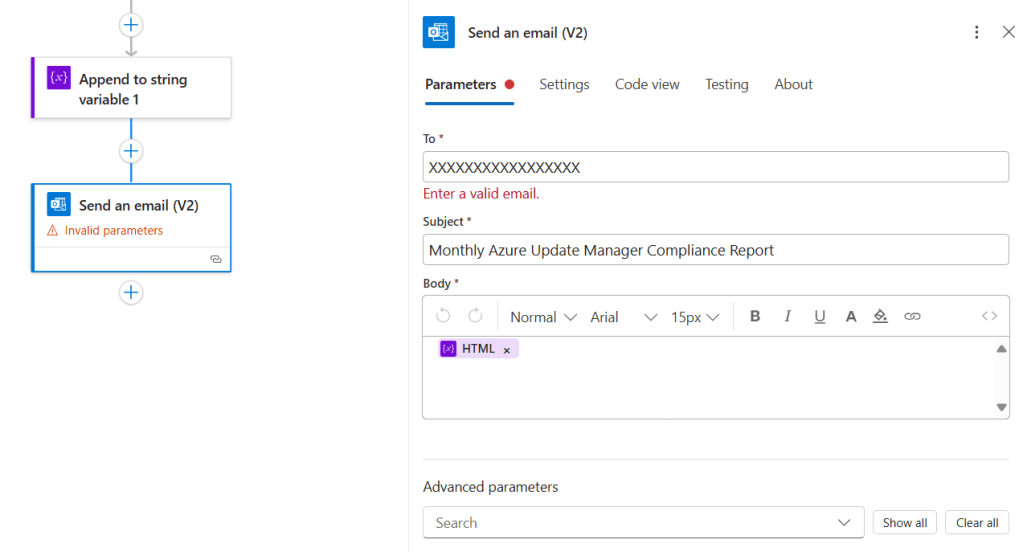
</tbody></table></body></html>Action 12 — Send an email (V2)
- Subject: Monthly Azure Update Compliance
- Body:
@{variables('HTML')} - Connection: an O365 connection using a licensed mailbox
Tips & pitfalls
- Scope control: The tag filter ensures only governed VMs are reported.
- Order: Keep For each → Concurrency at 1 to preserve sort order.
- Null safety: Don’t call date format functions on nulls—this solution avoids that.
- Access: The Logic App’s Managed Identity needs Reader on the subscription(s).
- Performance: ARG is very fast; reports render in seconds even at scal
Nice enhancements (optional)
- CSV attachment: Use Create CSV table on the
Selectoutput and attach it in the email. - Teams post: Post the same HTML to a channel for quick visibility.
- Daily digest: Clone the Logic App, change schedule to daily, and rename the subject.
Wrap-up
Sometimes the gap between a great portal view and a stakeholder-friendly deliverable is a small, targeted automation. With Logic Apps + Azure Resource Graph, we created a report that is:
- Accurate (sourced from Update Manager),
- Focused (tag-scoped),
- Readable (HTML email with color-coding),
- Reliable (runs on a schedule, no manual steps).


 Get Practical