Hey everyone,
Today I’m going to talk about a common issue that I believe you’ve already faced in your infrastructure.
One way audio happens when you have a call between 2 phones (internal-internal or internal-external), and one of them cannot hear the other end.
The causes of one-way audio in IP Telephony can be varied, but the root of the problem usually involves IP routing issues.
Possible causes for the one-way audio issue:
* RTP traffic is being blocked or consumed by a Firewall or another security device.
* RTP traffic is being misrouted by a route recently added / learned, or a VRF or WAN.
* Signalling issues – Call agent is not passing the correct ports or codec, or the communication is tagged as ‘send only’ or ‘receive only’.
* RTP traffic is corrupted.
* One side is not transmitting.
A quick way to check if there’s been audio during a call is by checking its statistics.
There are 2 ways to do that. Using Jabber/Deskphones statistics, or accessing Phone’s web page and checking also the statistics.
During a call, in your Jabber, press Crtl + Shift + S to open the call statistics. A pop up window like that will appear:

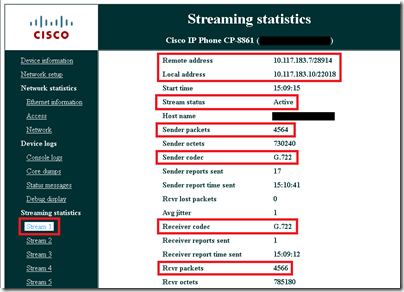
If you are not part of the call, you can check that through phone’s web page. Open it (using phone’s IP Address), and go to Stream 1 in the left menu. The whole statistic will come up in the middle. Check if the IP address and port match the information on both sides. Keep pressing the ‘stream 1’ link and you will notice that the TX and RX stats keep increasing.
Here you can check the ‘Local’ and ‘Remote’ IP addresses, then you see the port. If the information is the same on the other side, (‘Local’ on one side should correspond to the ‘Remote’ on the other), then signalling is good.
You can also check if the Coded used is the one you were expecting. If not, change the codec preference list or the available BW on the region.

Now, let’s have a look at some scenarios and solutions, and most common issues found in the field.
Some Cisco IOS gateways, such as the VG200, disable IP routing by default. This default setting leads to one-way voice problems.
Ensure that IP routing is enabled on your router. In order to enable IP routing, issue this global configuration command on your Cisco IOS gateway:
voice-ios-gwy(config)#ip routing
Always check basic IP reachability first. Because Real-Time Transport Protocol (RTP) streams are connectionless (transported over UDP), traffic may travel successfully in one direction but get lost in the opposite direction. This diagram shows a scenario in which this can happen:
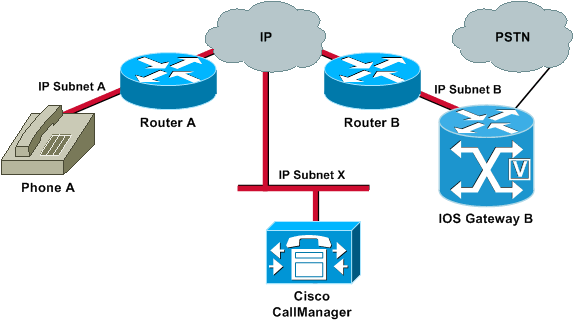
Subnets A and B can both reach Subnet X. Subnet X can reach Subnets A and B. This allows the establishment of TCP connections between the end stations (A and B) and the Cisco Call Manager. Therefore, signalling can reach both end stations without any problems, which allows the establishment of calls between A and B.
Once a call is established, an RTP stream that carries the audio must flow in both directions between the end stations. In some cases, Subnet B can reach Subnet A, but Subnet A cannot reach Subnet B. Therefore, the audio stream from A to B always gets lost.
This is a basic routing issue. Use IP routing troubleshooting methods in order to get to the stage at which you can successfully ping Phone A from Gateway B. Remember that ping is a bidirectional verification.
If transcoding is configured for an Intercluster trunk (ICT), ensure that a Media Termination Point (MTP) is configured in the Media Resource Group and Media Resource Group List associated with the trunk. If you specify an MTP when one is not needed, or fail to configure an MTP if it is needed, it has been known to cause one way voice issues for ICT configurations.
When the Cisco IOS gateway has multiple active IP interfaces, some of the H.323 signalling may be sourced from one IP address and other parts of it may reference a different source address. This can generate various kinds of problems. One such problem is one-way audio.
In order to get around this problem, you can bind the H.323 signalling to a specific source address. The source address can belong to a physical or virtual interface (loopback). Use the h323-gateway voip bind srcaddr ip-address command in interface configuration mode. Configure this command under the interface with the IP address to which the Cisco Call Manager points.
One-way voice can occur in Media Gateway Control Protocol (MGCP) gateways if the source interface for signalling and media packets is not specified. You can bind the MGCP media to the source interface if you issue the mgcp bind media source-interface interface-id command and then the mgcp bind control source-interface interface-id command. Reset the MGCP gateway in Cisco Call Manager after you issue the commands.
If the mgcp bind command is not enabled, the IP layer still provides the best local address.
The guidelines for the mgcp bind command are:
* When there are active MGCP calls on the gateway, the mgcp bind command is rejected for both control and media.
* If the bind interface is not up, the command is accepted but does not take effect until the interface comes up.
* If the IP address is not assigned on the bind interface, the mgcp bind command is accepted but takes effect only after a valid IP address is assigned. During this time, if MGCP calls are up, the mgcp bind command is rejected.
* When the bound interface goes down, either because of a manual shutdown on the interface or because of operational failure, the bind activity is disabled on that interface.
* When bind is not configured on the Media Gateway Controller (MGC), the IP address that is used to source MGCP control and media is the best available IP address.
If you find that there are clock slips on the E1 or T1 interface from the show controller {e1 | t1} command, there might be some mismatch in the clocking configuration on the Voice Gateway.
Two useful commands to use in order to verify packet flow are the debug cch323 rtp command and the debug voip rtp command. The debug cch323 rtp command displays packets that are transmitted (X) and received (R) by the router. An uppercase character indicates successful transmission or reception. A lowercase character indicates a dropped packet.
voice-ios-gwy#debug cch323 rtp
RTP packet tracing is enabled
voice-ios-gwy#
!— This is an unanswered outgoing call. !— Notice that the voice path only cuts through in the forward direction and !— that packets are dropped. Indeed, received packets are traffic from the !— IP phone to the PSTN phone. These are dropped until the call is answered.
Mar 3 23:46:23.690: ****** cut through in FORWARD direction *****
XXXrXrXrXrXrXrXrXrXrXrXrXrXrXrXrXrXrXrXrXrXrXrXrXrXrXrXrXrXrXrXrXrXrXrXrXrXrXrXrXr
XrXrXrXrXrXrXrXrXrXrXrXrXrXrXrXrXrXrXrXrXrXrXrXrXrXrXrXrXrXrXrXrXrXrXrXrXrXrXrXrXr
XrXrXXrrrrrrrrrrrrrrrr
voice-ios-gwy#
voice-ios-gwy#
!— This is an example of an answered call:
voice-ios-gwy#
voice-ios-gwy#
*Mar 3 23:53:26.570: ****** cut through in FORWARD direction *****
XXXrXrXrXrXrXrXrXrXrXrXrXrXrXrXrXrXrXrXrXrXrXrXrXrXrXrXrXrXrXrXrXrXrXrXrXrXrXrXrXr
XrXrXrXrXrXrXrXrXrXrXrXrXrXrXrXrXrXrXrXrXrXrXrXrXrXrXrXrXrXrXrXrXrXrXrXrXrXrXrXrXr
XXrrrrrXrXrXrXrXrXrXrXrXrXrXrXrrXXrrXrXrXrXrXrXXXXXXXXXXXXXXXXrXXXXXXXXrXrXrXXrrXr
XrXrXrXrXrXrXrXrXXrrrrrrrrrrrrrrrrrrrrrrrrrrrrrr
!— At this point, the remote end picks up the phone.
*Mar 3 23:53:30.378: ****** cut through in BOTH direction *****
XRXRXRXRXRXRXRXRXXRRRRRRRRRRRRRRRRRRRRRRRRRRRRRRRRRRRRRRRRRRRRRRRRRRXRXRXRXRXRXRXR
XRXRXRXRXRXRXRXRXRXRXRXRXRXRXXRRRRRRRRRRRRRRRRRRRRRRRRRRRRRRRRRRRRRRRRRRXRXRXRXRXR
XXRRXRXRXXRRXRXRXRXRXXRXRXRXRXRXRRXRXXRXRXRXRXRXRXRXRXRXRXRXRXRXRXRXRXRXRXRXRXRXR
XRXRXRXRXRXRXRXRXRXRXRXRXRXRXRRRRRRRRRRRRRRRRRRRRXRXRXRXRXRXRXRXRXRXRXRXRXRXRXRXR
XRXRXRXRXRXRXRXRXRXRXRXRXRXRXRXXRRRRRRRRRRRRRRRRRRRRRRRRRRRRXRXRXRXRXRXRXRXRXRXR
XRXRXRXRXRXRXRXRXRXRXRXRXRXRXRXRRRRRRRRRRRRRRRRRRRRRRRRRRRRRRRRRRRRRRRRRRRRRRRRRRRRR
RRRRXRXRXRXRXRXRXRXRXRXRXRXRXRXRXRXRXRXRXRXRXRXRXRXRRXXRXRXRXRXRXRRXRXRXRXRXRXRXRXR
XRXRXRXRXRXRXRXRXRXRXRXRXRXRXRXRXRXRXXRRRRXRXRXRXRXRXRXRXRXRXRXRXRXRXRXRXRXRXR
XXRRRRRRRRRXRXRXRXRXRXRXRXRXRXRXRXRXRXRXRXRXRXRXRXRXRXRXRXRXRXRXRXRXRXRXRXRXRXRXRXR
XRXRXRXRXRXRXRXRXRXRXRXRXRXRXRXRXRXRXRXRXRXRXRXRXRXRXRXRXRXRXRXRXRXRXRXRXRXRXRXRXR
XRXRXRXRXRXRXRXRXRXRXRXRXXRRRXR
!— This is the end of the conversation.
Note: In Cisco IOS Software Release 12.2(11)T and later, the debug cch323 rtp command-line interface (CLI) command has been replaced by the debug voip rtp command.
voice-ios-gwy#debug voip rtp
——–cut through in BOTH direction——————-
*Mar 27 19:52:08.259: RTP(32886): fs rx d=10.48.79.181(20002),
pt=0, ts=4FFBF0, ssrc=8E5FC294
*Mar 27 19:52:08.275: RTP(247): fs tx d=10.48.79.181(20002),
pt=0, ts=5D00C8D9, ssrc=1F1E5093
*Mar 27 19:52:08.279: RTP(32887): fs rx d=10.48.79.181(20002),
pt=0, ts=4FFC90, ssrc=8E5FC294
*Mar 27 19:52:08.295: RTP(248): fs tx d=10.48.79.181(20002),
pt=0, ts=5D00C979, ssrc=1F1E5093
*Mar 27 19:52:08.299: RTP(32888): fs rx d=10.48.79.181(20002),
pt=0, ts=4FFD30, ssrc=8E5FC294
*Mar 27 19:52:08.315: RTP(249): fs tx d=10.48.79.181(20002),
pt=0, ts=5D00CA19, ssrc=1F1E5093
*Mar 27 19:52:08.319: RTP(32889): fs rx d=10.48.79.181(20002),
pt=0, ts=4FFDD0, ssrc=8E5FC294
*Mar 27 19:52:08.335: RTP(250): fs tx d=10.48.79.181(20002),
pt=0, ts=5D00CAB9, ssrc=1F1E5093
*Mar 27 19:52:08.339: RTP(32890): fs rx d=10.48.79.181(20002),
pt=0, ts=4FFE70, ssrc=8E5FC294
*Mar 27 19:52:08.355: RTP(251): fs tx d=10.48.79.181(20002),
pt=0, ts=5D00CB59, ssrc=1F1E5093
*Mar 27 19:52:08.359: RTP(32891): fs rx d=10.48.79.181(20002),
pt=0, ts=4FFF10, ssrc=8E5FC294
*Mar 27 19:52:08.375: RTP(252): fs tx d=10.48.79.181(20002),
pt=0, ts=5D00CBF9, ssrc=1F1E5093
*Mar 27 19:52:08.379: RTP(32892): fs rx d=10.48.79.181(20002),
pt=0, ts=4FFFB0, ssrc=8E5FC294
*Mar 27 19:52:08.395: RTP(253): fs tx d=10.48.79.181(20002),
pt=0, ts=5D00CC99, ssrc=1F1E5093
*Mar 27 19:52:08.399: RTP(32893): fs rx d=10.48.79.181(20002),
pt=0, ts=500050, ssrc=8E5FC294
*Mar 27 19:52:08.976: RTP(282): fs tx d=10.48.79.181(20002),
pt=0, ts=5D00DEB9, ssrc=1F1E5093
*Mar 27 19:52:08.980: RTP(32922): fs rx d=10.48.79.181(20002),
pt=0, ts=501270, ssrc=8E5FC294
*Mar 27 19:52:08.996: RTP(283): fs tx d=10.48.79.181(20002),
pt=0, ts=5D00DF59, ssrc=1F1E5093
*Mar 27 19:52:09.000: RTP(32923): fs rx d=10.48.79.181(20002),
pt=0, ts=501310, ssrc=8E5FC294
*Mar 27 19:52:09.016: RTP(284): fs tx d=10.48.79.181(20002),
pt=0, ts=5D00DFF9, ssrc=1F1E5093
This is all for today.
I hope you’ve enjoyed 
See ya!
Bruno









 Get Practical