

Automating Azure App Registration secret rotation is often discussed as a best practice, but implementing it safely is where the real challenge begins.
In many Azure environments, client secrets are stored in Azure Key Vault, expiry alerts are configured, and operational processes are defined. From a governance perspective, everything appears under control.
But monitoring secret expiration is not the same as designing a safe, deterministic rotation model.
Recently, I worked with a customer who had a mature Azure environment.
They had:
- Azure Key Vault properly configured
- Monitoring in place for secret expiry
- Clear ownership of application registrations
- Good operational discipline
So this wasn’t a “wild west” environment.
The problem was different.
Secret rotation was still largely reactive and manual. An alert would trigger, someone would rotate the secret, update Key Vault, validate the application, and eventually remove the old credential.
That works, until timing, sequencing, or human error introduce risk.
That’s where we decided to move from monitoring-driven rotation to deterministic automation with guardrails.
The Real Problem
The objective wasn’t simply:
“Rotate secrets automatically.”
It was:
- Rotate only when required
- Never rotate unnecessarily
- Never break production
- Maintain a single source of truth
- Make it safe to run unattended
And that changes the design completely.
Design Principle – Key Vault Is the Source of Truth
One of the most important architectural decisions was this:
We do not assume the “latest” secret is the active one.
We explicitly store metadata in Key Vault:
{
  "keyId": "...",
  "endDateTime": "...",
  "managedBy": "func-sec-rotator",
  "purpose": "clientSecret"
}
This allows us to:
- Identify exactly which credential is active
- Prevent accidental deletion later
- Make cleanup deterministic
- Avoid guessing based on timestamps
Without this, rotation becomes heuristic.
With it, rotation becomes deterministic.
Architecture Overview
The solution uses:
- Azure Function (PowerShell 7.4)
- System Assigned Managed Identity
- Microsoft Graph PowerShell modules
- Az.Accounts + Az.KeyVault
- Structured JSON logging
- Azure Key Vault as state reference
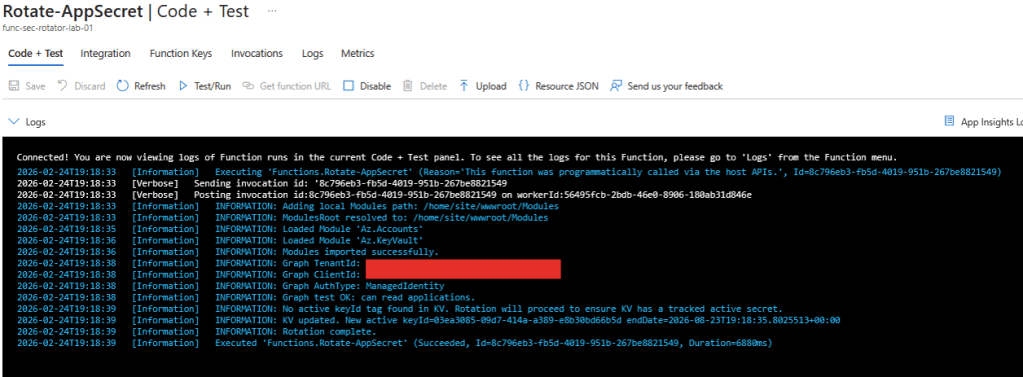
High-level flow:
- Retrieve App Registration from Microsoft Graph
- Read active
keyIdfrom Key Vault tags - Validate the corresponding credential in Entra ID
- If healthy beyond threshold → NO-OP
- If near expiry (<=30 days) → create new secret
- Store new secret value in Key Vault with metadata
Step-by-Step Implementation
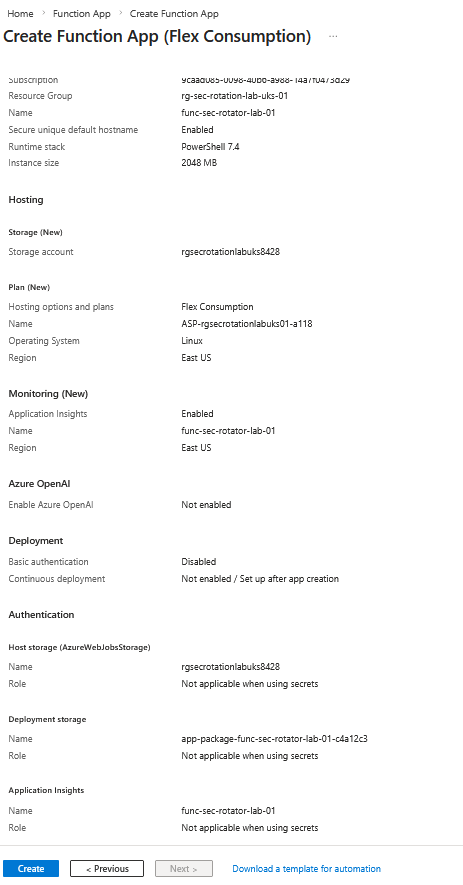
1️⃣ Azure Function (PowerShell 7)
Runtime:
- PowerShell 7.4
- Managed Identity enabled
This avoids any stored credentials.
2️⃣ Permissions
Because we’re using a Managed Identity, there are no stored credentials anywhere.
But that identity still needs explicit permission to:
- Read and create application secrets
- Read and update Key Vault secrets
Microsoft Graph (Application Permissions)
Required:
Application.ReadWrite.All
This permission allows the Managed Identity to:
- Read application registrations
- Create new passwordCredentials
- Remove old credentials (later, during cleanup)
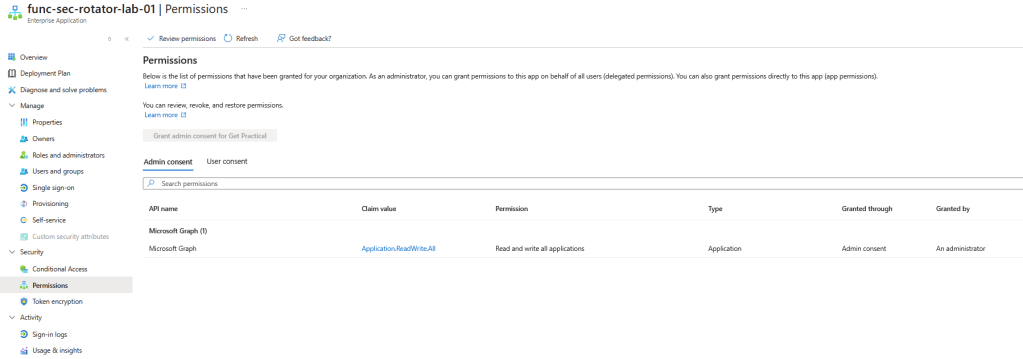
Without this permission, the function would be able to authenticate to Graph — but not modify application secrets.
Important:
This is an Application permission, not Delegated.
Which means:
- It runs without a user context
- It requires Admin Consent
- It should be granted carefully and intentionally
In this case, it is scoped to automation managing controlled App Registrations, not general directory operations.
Azure RBAC (Key Vault)
Required role:
- Key Vault Secrets Officer
This role allows the Managed Identity to:
- Read existing secret values
- Create new secret versions
- Update secret tags
It does not allow certificate or key management — only secrets.

This follows the principle of least privilege:
- Graph permission handles identity layer
- Azure RBAC handles secret storage layer
Two separate security boundaries.
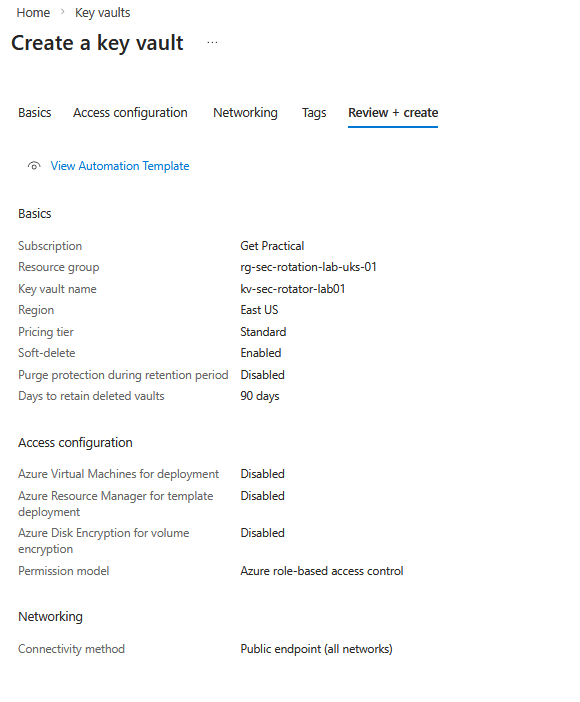
That separation is intentional.
3️⃣ Function App Settings (Environment variables)
TARGET_APPID
KEYVAULT_NAME
KV_SECRET_NAME
ROTATE_DAYS_BEFORE = 30
NEW_SECRET_LIFETIME_DAYS = 180
AUTOMATION_PREFIX = auto-rotated
MANAGED_BY = func-sec-rotator
EXPIRY_GRACE_HOURS = 96
MIN_EXPIRED_DAYS = 3
This makes the solution reusable across multiple apps.
4️⃣ Review and Deploy the Rotation Script
The full production-ready script includes:
- Return-safe step execution
- Structured logging
- Explicit secret validation
- Guardrails to prevent unnecessary rotation
I’ll share the full code in my GitHub repository (linked below), so you can:
View the complete rotation script on Github
- Deploy it as-is
- Adapt it to your naming standards
- Integrate it into your own environment
The goal isn’t to hide complexity.
It’s to make it reusable.
The Core Rotation Logic
Calculating the Threshold (And Why the Buffer Exists)
This was one part that even I had to think through carefully.
The threshold calculation looks simple:
$bufferDays = 2
$minGoodEnd = (Get-Date).AddDays($RotateDaysBefore + $bufferDays)
At first glance, the buffer may look unnecessary.
If we rotate 30 days before expiry, why add 2 extra days?
Here’s why.
Scenario Without Buffer
Let’s say:
- RotateDaysBefore = 30
- Secret expires on April 30
- Today is March 31
Mathematically:
April 30 – March 31 = 30 days
So rotation should happen.
But what if:
- The function runs at 00:01 UTC
- The secret was created in a different timezone
- There’s slight clock skew
- Or execution is delayed by minutes
You might fall into an edge case where:
- One run rotates
- The next run thinks it’s still within threshold
- Or worse, rotates again
What the Buffer Solves
The buffer adds stability.
Instead of rotating exactly 30 days before expiry, we rotate when:
Expiry date <= 32 days from now
That extra 2-day window:
- Avoids borderline execution timing
- Prevents flapping behavior
- Protects against minor time inconsistencies
- Makes scheduled execution predictable
In identity automation, edge cases are where incidents happen.
The buffer isn’t about being aggressive.
It’s about being stable.
Validating the Active Secret
- Read
keyIdfrom Key Vault - Match it against
$app.PasswordCredentials - Evaluate expiration date
If:
$activeEnd -gt $minGoodEnd
Then we explicitly stop:
Write-Log "Active secret valid beyond threshold; no rotation needed"
return
This is critical.
Automation that rotates every time it runs is not intelligent automation.
It’s credential sprawl.
Creating the New Secret Safely
If rotation is required:
$newSecret = Add-MgApplicationPassword -ApplicationId $app.Id -BodyParameter $body
Immediately after:
- Store
SecretTextin Key Vault - Tag it with
keyId,endDateTime, and metadata - Log the operation (without exposing the secret value)
Important detail:
Microsoft Graph only returns SecretText once.
If you lose it, you cannot retrieve it again.
This is why storing it immediately and atomically is essential.
Guardrails Built Into the Solution
We implemented multiple safety layers:
- No rotation if active secret is still valid
- No assumptions based on “latest secret”
- Explicit validation against Key Vault metadata
- Structured JSON logs per execution step
- Step timing for observability
This allows the function to run on a schedule safely.
It also makes troubleshooting straightforward.
What Changed for the Customer
The customer didn’t lack monitoring.
They lacked deterministic automation.
After implementing this:
- Alerts are now informational, not reactive
- Rotation is predictable
- Secrets are traceable
- The system can run unattended
Monitoring remains important — but it is no longer the safety net.
Why This Matters
Identity automation is different from other automation.
If a VM scale set misbehaves, you usually get performance degradation.
If a client secret misbehaves, you get:
- Immediate authentication failure.
- The margin for error is smaller.
That’s why rotation needs guardrails — not just scripting.
In the next post, I’ll cover the second half of the problem:
Safe expired secret cleanup.
Because rotating correctly is only part of the equation.
Keeping the environment clean, without risking production, requires just as much care.


 Get Practical