
Introduction
AI assistants for Azure are everywhere right now. Most of them fall into one of two categories:
- Chatbots with documentation knowledge, but no access to your environment
- ChatGPT + Azure CLI wrappers, which still require credentials, tokens, and a lot of trust
I wanted to explore something different:
Can we build a genuinely useful Azure assistant that can see my environment, query real data, and still be safe by design?
This is where Azure MCP (Model Context Protocol) comes in.
⚠️ Important note
Everything described in this post uses Azure MCP Server v2.x, which is currently in preview. Any version 2.0 and above is preview.
This is a simple lab scenario — but it clearly shows a very interesting future that is not far away.
What is Azure MCP (in simple terms)
Azure MCP introduces a controlled execution layer between an AI model and Azure.
Instead of giving an AI:
- Azure CLI access
- Tokens
- Secrets
- Or contributor permissions
You give it:
- A Model Context Protocol server
- Running in Azure
- Authenticated via Managed Identity
- With explicitly defined capabilities
The AI doesn’t “log in to Azure”.
It can only call approved tools, exposed by the MCP server.
Think of it as:
Azure RBAC + API surface + safety rails — for AI agents
The goal: an Azure super-assistant (read-only)
For this experiment, my goal was very specific:
- ✅ Inspect Azure resources
- ✅ List and query real data
- ✅ Help with troubleshooting and visibility
- ❌ Never create, update, or delete anything
This makes it ideal for:
- Cloud Ops
- Support teams
- Architecture reviews
- Audits
- Learning environments
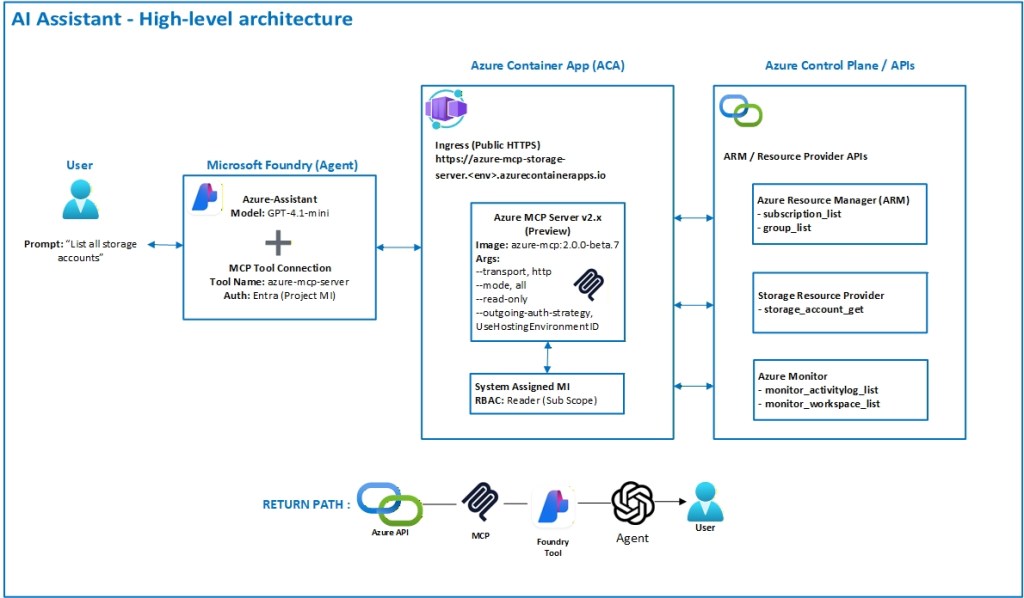
High-level architecture
Here’s the simple architecture I used.
Step 1 – Create the Azure Container Apps environment
First, I created a dedicated resource group and Container Apps environment to host the MCP server.
Example (simplified):
az group create '
  --name rg-mcp-server '
  --location uksouth

az containerapp env create '
  --name azure-mcp-env '
  --resource-group rg-mcp-server '
  --location uksouth
Nothing special here — standard Container Apps setup.
Step 2 – Deploy Azure MCP Server as a Container App
I deployed Azure MCP Server v2.0.0-beta using the official Microsoft container image.
Key points:
- Public HTTP endpoint (for Foundry / Copilot access)
- No secrets
- No connection strings
- Authentication handled by Managed Identity
Example:
az containerapp create '
  --name azure-mcp-storage-server '
  --resource-group rg-mcp-server '
  --environment azure-mcp-env '
  --image mcr.microsoft.com/azure-sdk/azure-mcp:2.0.0-beta.7 '
  --ingress external '
  --target-port 8080 '
  --cpu 0.25 '
  --memory 0.5Gi
Step 3 – Enable Managed Identity on the MCP server
This is critical.
The MCP server authenticates to Azure only using Managed Identity.
az containerapp identity assign '
  --name azure-mcp-storage-server '
  --resource-group rg-mcp-server
Then I granted read-only permissions at subscription scope:
az role assignment create '
  --assignee <MCP_MANAGED_IDENTITY_OBJECT_ID> '
  --role Reader '
  --scope /subscriptions/<subscription-id>
No Contributor.
No Owner.
No shortcuts.
Step 4 – Start MCP Server in read-only “all tools” mode
This is where most of the behaviour comes from.
The MCP server is started with explicit arguments:
--transport, http,
--outgoing-auth-strategy, UseHostingEnvironmentIdentity,
--mode, all,
--read-only
What this does:
UseHostingEnvironmentIdentity
→ Forces Managed Identity for all Azure calls--mode all
→ Exposes every available MCP tool individually
(storage, resource groups, monitor, AKS, SQL, etc.)--read-only
→ Hard blocks any write operation, even if the tool exists
This single flag is what makes the setup safe.
Step 5 – Verify available MCP tools
Before connecting any AI agent, I checked what the server actually exposes.
Inside the container:
azmcp tools list --name-onlyThis returned the real tool inventory, including:
group_liststorage_account_getmonitor_activitylog_listmonitor_workspace_listsubscription_listvirtualdesktop_*- many others
And importantly:
- ❌ No generic
virtualMachines_*tools - ❌ No unrestricted ARM access
Step 6 – Create the AI agent (Azure Foundry)
In Microsoft Foundry, I created a simple agent:
- Model:
gpt-4.1-mini - Type: Prompt-based agent
- Tool attached: azure-mcp-server (MCP)
No plugins.
No API keys.
No secrets.
Step 7 – Agent instructions (very important)
The agent instructions explicitly define how it should behave.
Key design decisions:
- No hardcoded subscription
- No hardcoded tenant (unless required)
- Prefer MCP defaults
- Ask only when a tool fails
Example excerpt:
You are an Azure super-assistant with read-only access to my Azure environment through a Model Context Protocol (MCP) server.

Authentication, tenant, and subscription context are managed by the MCP server and Managed Identity. Do not hardcode subscription or tenant values unless explicitly provided by the user.
This prevents the agent from:
- Asking for IDs unnecessarily
- Hallucinating scope
- Making unsafe assumptions
Step 8 – Test with real prompts (smoke tests)
I validated everything using real environment queries:
Inventory
- List subscriptions
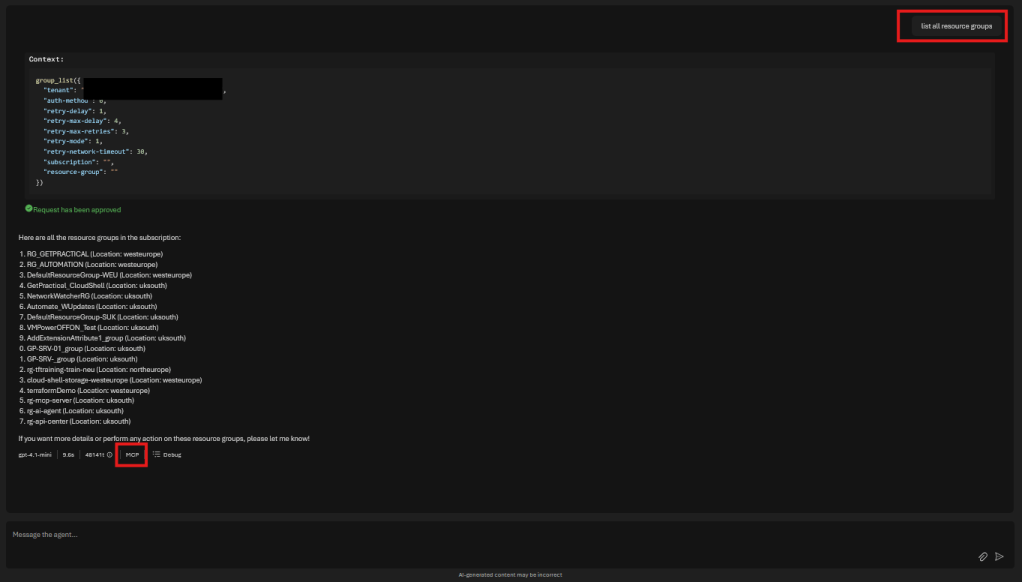
- List resource groups
- List storage accounts with regions
#Result
#Result
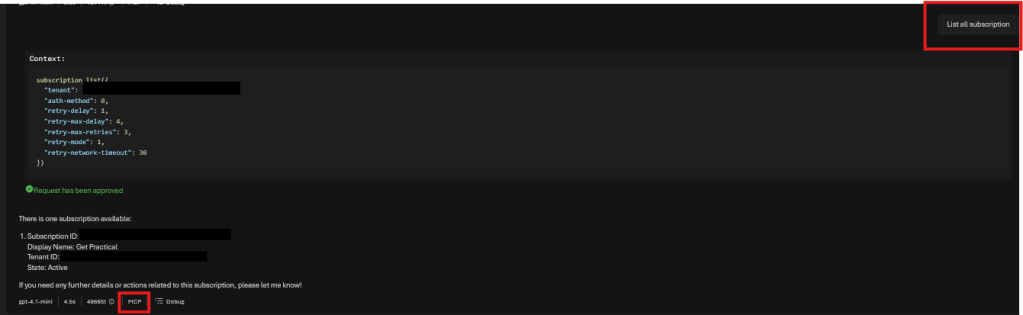
Each response was:
- Real Azure data
- Scoped by RBAC
- Enforced by MCP, not the model
Why this approach works so well
- Security is enforced outside the AI
- Managed Identity replaces secrets
- Read-only mode removes blast radius
- Tool discovery is explicit
- The model becomes an interpreter, not an operator
This is, intentionally, a simple test environment.
There is no complex orchestration, no multi-tenant routing logic, no write operations, and no advanced guardrails. Everything here is running in read-only mode, using preview components (any Azure MCP Server version 2.0+ is still in preview at the time of writing).
What we built here is not the end goal — it’s the foundation.
A small, controlled, practical lab that proves the model:
Agents + MCP + Managed Identity + Azure = a very real future, much closer than it looks.
And the best part?
You can build it today, break it safely, and evolve it at your own pace.
Merry Christmas and Happy New Year!


 Get Practical