

Hi folks,
Today we’ll talk about how to set up Azure Auto-Shutdown through the Azure portal.
This feature allows the machine to be programmed to shut down every day at the same time if you turn it on at some point throughout the day. Also, through the Auto-Shutdown you can configure a “Webhook” to notify the VM shutdown.
But what does “Webhook“ mean?
WebHook is a concept called “Web callback” or “HTTP Push API”, it is an application to provide other applications with information in real-time. The webhook provides data for other applications, meaning that you get data right away. Unlike typical APIs where you need to search for data very often in order to get it in real-time.
How to Configure Auto-Shutdown
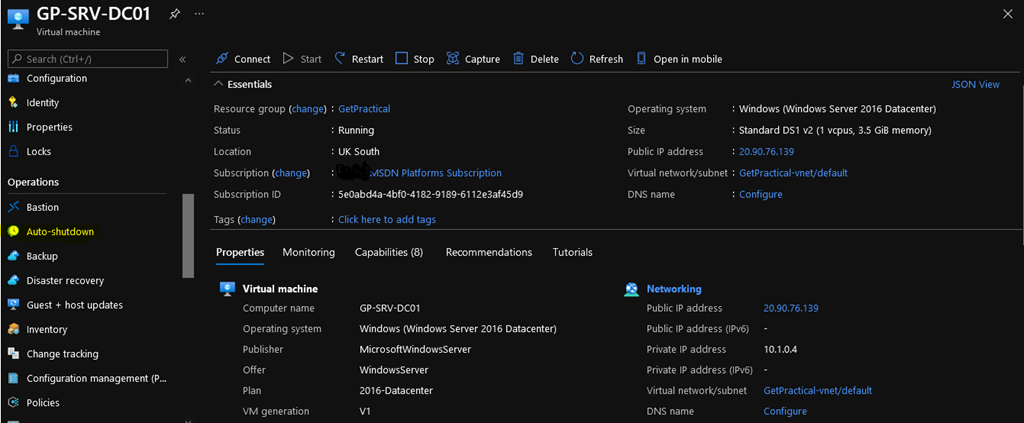
To configure go to your virtual machine, in the Operations bar click on “Auto-Shutdown”.
Now we are going to add the time that the VM will be turned off, the Time Zone of your region and if you have any Webhook or email click on “yes” to add it then click on “Save“.
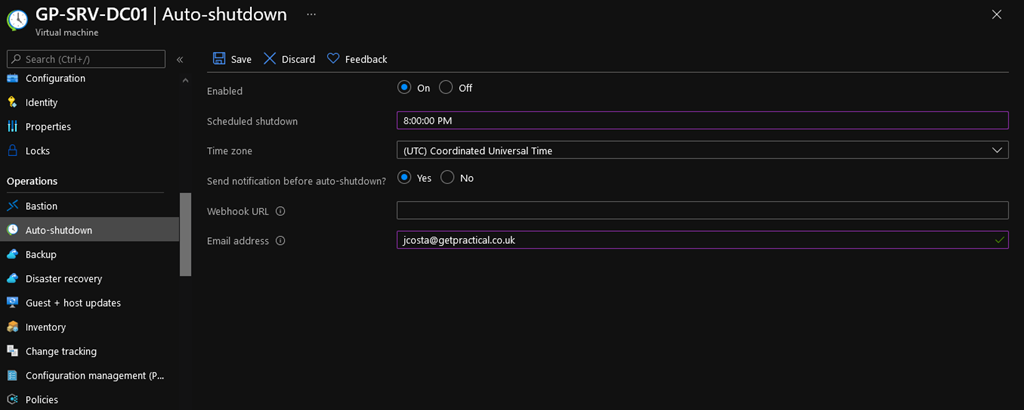
All done! My virtual machine is set up to shut down through Auto-Shutdown.

That’s all for now guys, see you then!

 Get Practical